
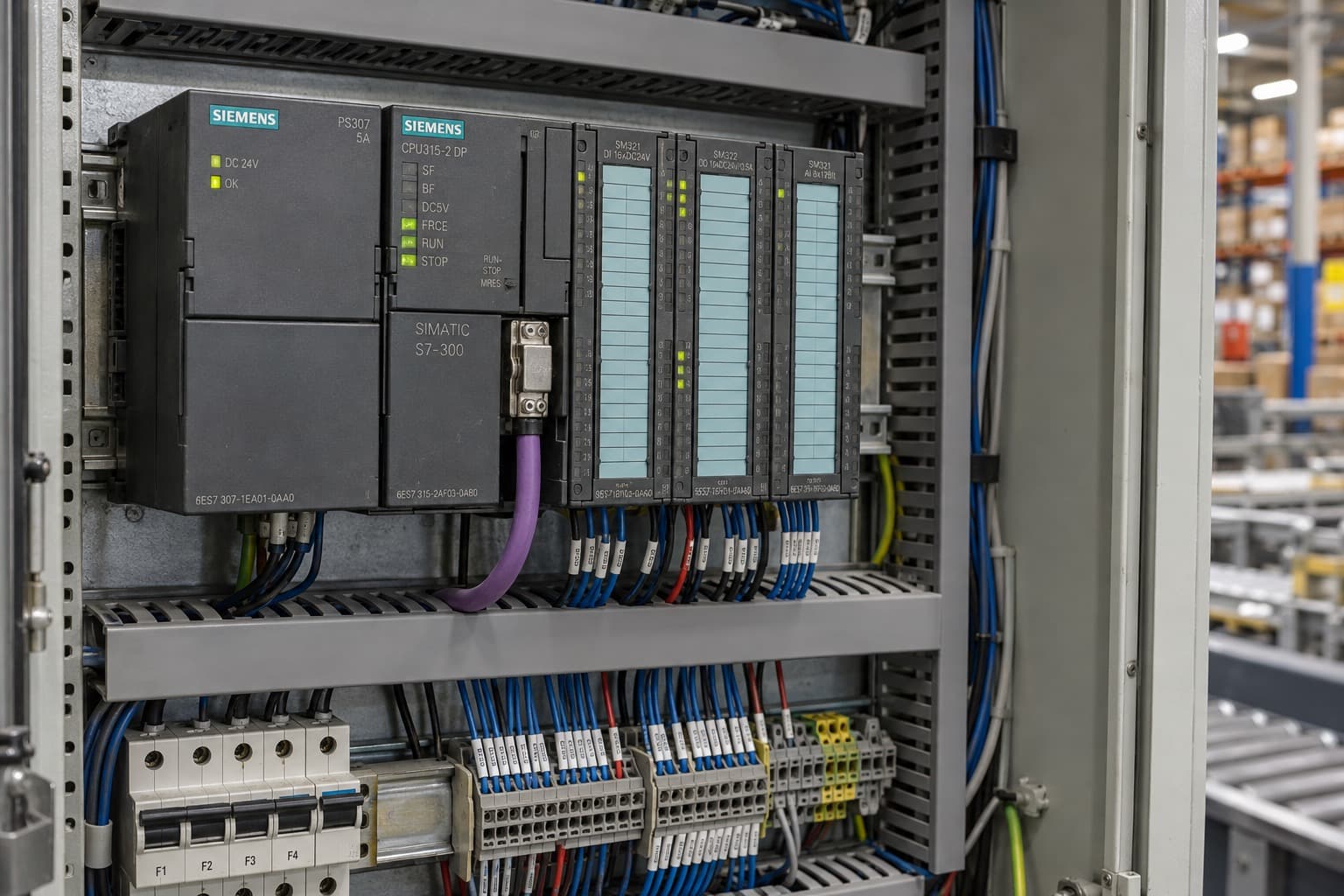
The S7-300 is no longer a Siemens product you can order new. It is a spare part with a seven-year clock. Here is how to use that time without getting caught out by a single failed module.
It is 02:40 on a Tuesday. A packaging line is down, and the CPU 315-2 DP in the main cabinet is showing a solid SF light. The maintenance lead pulls the order number off the front: 6ES7315-2AH14-0AB0. Purchasing checks Siemens’ lifecycle information and finds a reassuring date: spare parts until 2033.
That date answers a planning question. It does not answer the question the plant manager is asking at 02:40: can the right replacement be on site, loaded with the right program and running by the morning shift?
For the many plants still running SIMATIC S7-300 and ET 200M, those are two very different questions. This article explains what the 2033 date actually commits to, where the real risks sit, and how to build a spares and migration plan that holds up when something fails.
Where the S7-300 and ET 200M stand today
As of October 2026, the S7-300 and ET 200M families are past product cancellation and in the spare parts phase. Siemens uses numbered lifecycle phases, and three of them matter here:
| Date | Siemens phase | What it means for you |
|---|---|---|
| 1 October 2023 | PM400: phase-out | The end of normal availability. Still orderable for later use until cancellation. The signal to start planning. |
| 1 October 2025 | PM410: product cancellation | No longer sold as a new-build product. Available from Siemens as a spare part only. |
| Until 1 October 2033 (planned) | Spare parts phase | Siemens plans to supply spares. ‘Planned’ is not ‘guaranteed’, and stock is finite. |
Source: Siemens, SIMATIC PCS 7 Remote I/O Upgrade Guideline (entry 109824203, V2.0), section 1.1, and Siemens’ phase-out notice for S7-300 / ET 200M components.
Two details are easy to miss. First, Siemens notes that single components can have their own dates. Siemens’ product data shows it for parts many plants hold:
- PS 307 5 A power supply (6ES7307-1EA01-0AA0): cancelled on 1 October 2026, a year after the rest of the family.
- IM 153-1 interface module (6ES7153-1AA03-0XB0): cancelled on 1 October 2024, a year before the family.
- Micro Memory Card 512 KB (6ES7953-8LJ31-0AA0): phase-out announced, not yet cancelled.
Second, a spare parts phase changes how you buy: quantities, prices and lead times are no longer those of a catalogue product. Check the exact order number on Siemens Industry Online Support rather than relying on the family headline. The status of each order number we have checked is in the S7-300 part status list.
What ‘available until 2033’ does not tell purchasing
A lifecycle date describes a manufacturer’s intent for a product family. It says nothing about a specific order on a specific day. It will not tell your buyer:
- Whether the quantity you need physically exists anywhere right now.
- Where those units are, and how fast they can ship.
- What condition they are in, and what hardware or firmware version they carry.
- Whether a proposed alternative will work in your installed system.
A catalogue entry, a lifecycle record and a supplier’s stock confirmation are three different documents. Plants that treat them as interchangeable end up with a purchase order but no recovery plan. And as the installed base shrinks and spares get consumed, availability of common modules will tighten well before 2033, not on the day itself.
Step 1: identify the installed part, not the family
‘An S7-300 module’ starts a conversation. It is not a replacement specification. The full 6ES7 order number, read off the installed unit with every suffix, is.
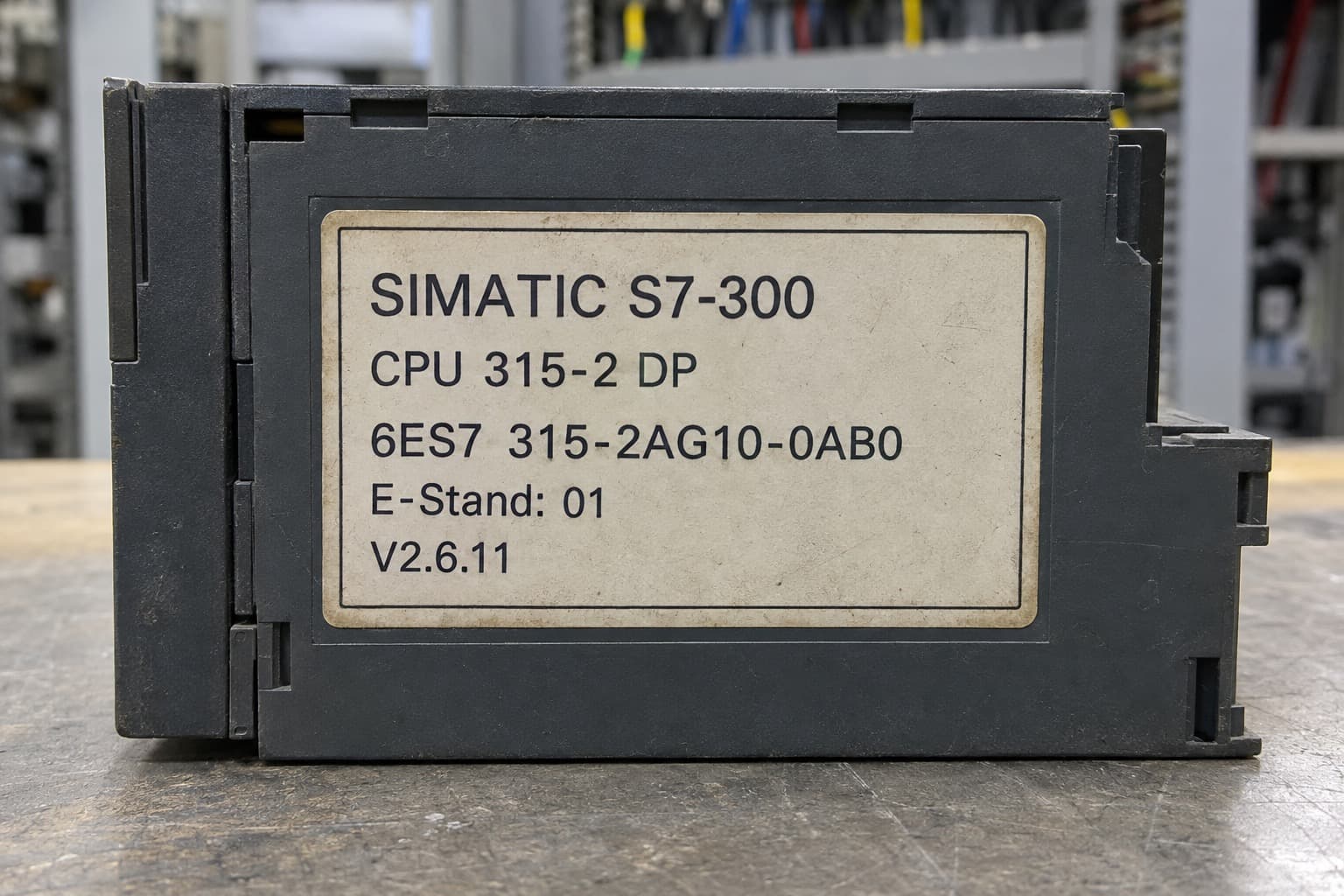
The suffix matters. A CPU 315-2 DP exists in several generations (for example 6ES7315-2AG10 and 6ES7315-2AH14), with different memory, performance and firmware. A newer version is often, but not always, a drop-in replacement. The same applies to IM 153 interface modules in ET 200M stations, where IM 153-1, IM 153-2 and their high-feature variants are not interchangeable without checking the configuration and, for redundant systems, the redundancy setup.
Before you request a quotation, capture:
| Information | What to provide |
|---|---|
| Identity | Full order number and clear photos of the nameplate |
| Version | Hardware revision (the ‘ES’ or ‘FS’ marking) and firmware version |
| Installation | Central rack or ET 200M station, interface module and bus type (PROFIBUS DP or PROFINET) |
| Accessories | Front connectors (20 or 40 pin), Micro Memory Card, bus connectors, active backplane bus modules |
| Quantity | Immediate need, plus any separate strategic spares requirement |
| Condition | Which conditions you accept: new sealed, new surplus, used, refurbished |
| Timing | Required delivery date and destination |
| Alternatives | Whether substitutes may be proposed, subject to your engineer’s approval |
Any difference in order number should trigger a compatibility review by the responsible engineer. Same housing, same family and same colour are not evidence of interchangeability. For the enquiry itself, see how to request an S7-300 quote.
Step 2: a spare on the shelf is not a recovery plan
A spare CPU in the storeroom solves one dependency. On a typical S7-300 site, at least five more decide whether the line restarts in two hours or two days:
- A current program backup. Is the project file on the engineering laptop the one actually running, or last year’s version before the conveyor modification?
- The Micro Memory Card. S7-300 CPUs from the MMC generation will not run without one, and it is not supplied with the CPU. The card must be large enough for the program.
- Engineering software and licences. Can someone open the project today, in the STEP 7 or TIA Portal version it was built in, on a laptop with a working PROFIBUS or MPI adapter?
- Know-how. Who restores the hardware configuration, downloads the program and checks the I/O? Is that person internal, a contractor, or the integrator who retired in 2019?
- A test method. How will you confirm the restored system behaves as it did before the failure?
Ask the responsible engineer to define what must be backed up and to run a recovery test on a non-critical day. A file called ‘backup_final’ is not evidence that the plant can recover.
Step 3: stock spares by consequence, not by catalogue
Buying one of every module ties up capital and still misses the failures that hurt most. Rank each component by what happens when it fails:
| Question | Why it changes the decision |
|---|---|
| Does it stop the whole line? | A CPU, power supply or IM 153 takes down everything behind it. A single 8-channel analog card may not. |
| How many machines use it? | A common digital input card used across six machines justifies a pooled spare. A one-off module may justify a different plan. |
| How fast can you really get one? | Use current quotations, not catalogue lead times. Record the date you checked. |
| Can you install and commission it? | Add engineering time, software and testing to the recovery estimate (Step 2). |
| How long will the machine run? | A line retiring in 2027 and a line running to 2035 deserve different budgets. |
The output is a short, defensible list: the five to ten parts whose failure would cost the most, with confirmed sources and a realistic recovery time for each. That list is also the easiest way to justify a spares budget to finance.
Step 4: buy from the secondary market with your eyes open
Once a product leaves the catalogue, more of the supply comes from the secondary market: surplus stock, refurbishers, brokers and independent distributors. Good independent suppliers fill a real gap. The market also carries risks you do not face when buying new from Siemens: grey-market units with unclear history, mislabelled versions, and counterfeit modules, particularly for high-value CPUs and communication processors.
Before accepting any quotation for a discontinued S7-300 or ET 200M part, ask the supplier to state in writing:
- The exact order number offered, including version, and any proposed substitute.
- The condition, in clear terms: new factory sealed, new surplus (opened), used, or refurbished.
- Provenance and identification: photos of the actual unit, nameplate and seals, and where it came from.
- Testing performed: what was tested, on what equipment, and the recorded result. ‘Tested’ on its own means nothing.
- Confirmed quantity and dispatch time, separating stock on hand from stock still being sourced.
- Warranty and return terms, including how a wrong version or a dead-on-arrival unit is handled.
- What is included: front connectors, MMC, bus connectors and backplane modules are often not.
Keep two questions apart: can the supplier find it? and is it technically right for our system? The first is commercial. The second belongs to your engineer.
Step 5: decide when migration enters the plan
Spares buy time. They should not become the strategy by default. Put migration on the agenda when any of these is true:
- Sourcing a critical part has become uncertain more than once.
- The line needs significant expansion or new functionality.
- Recovery depends on software, hardware or people that are getting hard to keep.
- A planned shutdown offers a window that will not come again for years.
Siemens names no direct successor for individual S7-300 order numbers in its product data. The route depends on the application:
| Installed system | Typical Siemens successor | What it involves |
|---|---|---|
| S7-300 CPU, central I/O (factory automation) | S7-1500 with ET 200MP or ET 200SP | Program conversion in TIA Portal, new hardware, rewiring or wiring adapters, full re-commissioning |
| ET 200M remote I/O under an S7 controller | ET 200SP or ET 200MP | New station hardware and configuration; PROFIBUS to PROFINET often considered at the same time |
| ET 200M in a PCS 7 process plant | ET 200SP HA | Hardware, communication, wiring and project changes, per Siemens’ PCS 7 Remote I/O Upgrade Guideline |
Sources: Siemens, Guide for migrating S7-300/S7-400 to S7-1500 (entry 109478811); Siemens, SIMATIC PCS 7 Remote I/O Upgrade Guideline (entry 109824203, V2.0), section 1.1.
In every case this is a system-engineering project, not a module-for-module swap. Confirm the route against the installed system, its safety functions and its operating requirements before committing budget. A phased approach, keeping a well-stocked S7-300 running while the successor is engineered and tested, is often the lowest-risk path.
Frequently asked questions
Is the Siemens S7-300 discontinued?
Yes. Siemens cancelled the S7-300 and ET 200M as products (PM410) on 1 October 2025. Since then they are available from Siemens as spare parts only.
How long can I buy S7-300 spare parts?
Siemens plans spare-part availability until 1 October 2033. Some individual order numbers have their own dates, and availability of specific parts can tighten before then.
What replaces the S7-300?
For most factory automation, Siemens' route is the S7-1500 with ET 200MP or ET 200SP I/O. In PCS 7 process plants, ET 200M is typically replaced by ET 200SP HA. Either way it is a migration project, not a module swap.
Can I replace an S7-300 module with a newer version of the same part?
Often, but not always. Different order number suffixes can mean different firmware, memory or functions. Have an engineer confirm compatibility first.
Is buying S7-300 parts from independent suppliers safe?
It can be, if you get written confirmation of the exact part, condition, provenance, testing and warranty. Treat vague descriptions such as 'tested' or 'like new' as a reason to ask more.
Use the next seven years on purpose
The value of the 2033 date is time. Use it in order: identify the installed parts, rank them by consequence, confirm supply for the ones that matter, prove you can recover, and set a date to decide on migration.
About the author: the TimControls Technical Team writes TimControls’s buying guides and lifecycle lists. TimControls is an independent supplier of current, surplus and discontinued industrial automation parts, including Siemens S7-300 and ET 200M. timcontrols.com
Last reviewed: October 2026.